
Symbology and Regex Filtering — The SCANDIT SDK's Five Filtering Layers
Last updated: 2026-06-10
TL;DR
Filtering in the SCANDIT SDK is a layered structure, not a single switch. Symbology enablement (Layer 1), Active Symbol Counts (Layer 2), and composite code configuration (Layer 3) are SDK-level pre-filters; app-callback regex validation (Layer 4) is the universal filter that works on every platform and product. BarcodeFilterSettings is NOT a BarcodeCapture feature — it belongs to BarcodeCount (MatrixScan Count) via BarcodeCountSettings.filterSettings (Layer 5), and MatrixScan AR has its own setBarcodeFilter() (8.1+). This guide covers each layer's selection criteria and the regex patterns common in Korean logistics and pharma deployments.
TL;DR
- SCANDIT SDK filtering is a five-layer structure: symbology enablement (Layer 1) → Active Symbol Counts (Layer 2) → composite code configuration (Layer 3) → app-callback regex (Layer 4) → product-specific filters (Layer 5).
- The earlier in the pipeline you block (Layers 1–2), the lower the battery and CPU cost. Settings changes apply at runtime via
applySettings()— no session restart. BarcodeFilterSettingsis not a BarcodeCapture feature. It belongs to BarcodeCount (MatrixScan Count) viaBarcodeCountSettings.filterSettings, with view display handled byBarcodeCountView+BarcodeFilterHighlightSettings.- Common Korean deployment patterns: 880-prefix EAN-13, 12-digit waybill numbers, GS1 DataMatrix AI(01) format (raw scan data contains no parentheses).
Scandit's Five Filtering Layers — Decision Tree
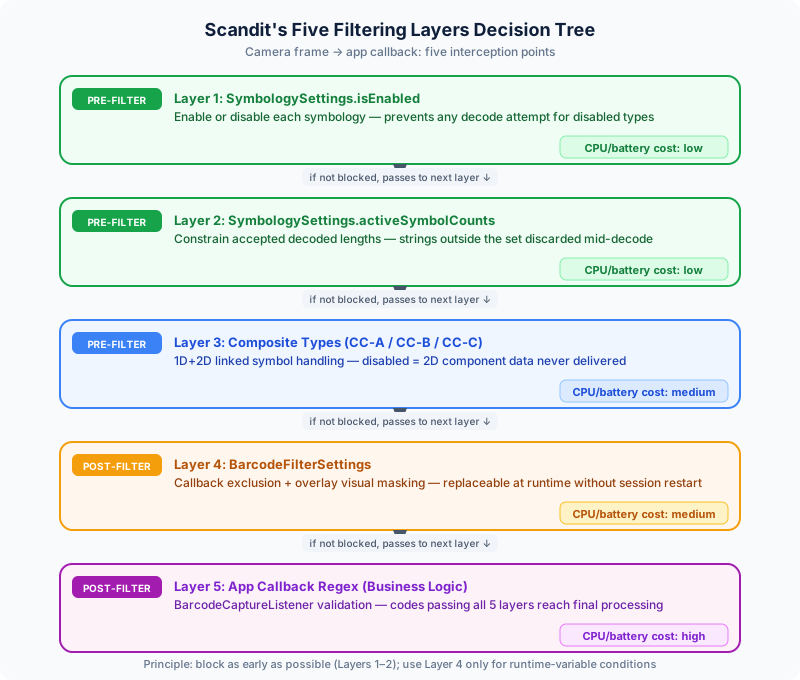
The SCANDIT SDK offers five filtering points across the recognition pipeline. Understanding the layering makes it quick to decide where blocking is most efficient and where flexibility is needed.
Layer 1: Symbology Enable/Disable — choose symbologies before recognition starts
Enable or disable individual symbologies via SymbologySettings.isEnabled. The SDK can recognize many symbologies simultaneously, but every enabled symbology your site doesn't need is wasted computation. A retail POS that only processes EAN-13 should enable EAN-13 only.
Layer 1 operates at the very top of the frame-processing pipeline. Disabled symbologies are never even attempted, so this layer has the smallest battery and CPU footprint of all five.
The SDK supports dozens of symbologies, but every symbology is disabled by default. Whether it's QR or EAN-13, anything you need must be explicitly enabled. Because the default is all-off, an allowlist approach is naturally enforced — list the symbologies your project needs and enable only those. Each additional active symbology adds processing time, so keeping the minimal set benefits both speed and accuracy.
iOS Swift: settings.set(symbology: .ean13UPCA, enabled: true). Android Kotlin: settings.enableSymbology(Symbology.EAN13_UPCA, true). Use enableSymbologies() to enable several at once. Web TypeScript and React Native follow the same pattern — see the code sample tabs at the top of this page.
Layer 2: Active Symbol Counts — constrain lengths up front
SymbologySettings.activeSymbolCounts specifies which data lengths a symbology will accept. If Code 39 is enabled but only 6-character codes are valid on site, set activeSymbolCounts = Set([6]) and other lengths are discarded during recognition.
EAN-13 is always 13 digits, so the setting is moot there — it matters for variable-length symbologies like Code 128, Code 39, and Code 93. Active Symbol Counts lives on the SymbologySettings object, so configure it when you enable the symbology.
iOS Swift — Code 39, accept 8 characters only
let symSettings = settings.settings(for: .code39)
symSettings.activeSymbolCounts = Set([8])
Android Kotlin — Code 39, accept 8 characters only
val symSettings = settings.getSymbologySettings(Symbology.CODE39)
symSettings.activeSymbolCounts = setOf(8)
The wider the accepted range, the higher the misread risk. If the code lengths used on site are known, allow the minimum range. Collect real code samples during field testing, confirm the length distribution, then fix the range — this sharply reduces surprises in production.
Layer 3: Composite Types — 1D+2D composite codes
GS1 Composite Codes combine a linear 1D carrier with a vertically attached 2D component (CC-A, CC-B). Some Korean pharmaceutical labels and GS1 drug standard codes use this format.
To recognize composites, explicitly enable the needed types via BarcodeCaptureSettings.enabledCompositeTypes (CompositeType.a, .b, .c). Enabling EAN-13 alone does not process the composite component. Since SDK 7, the constituent 1D/2D symbologies must also be enabled — enableSymbologiesForCompositeTypes() enables the required constituent symbologies for the chosen types in one call. CC-A carries up to 56 digits and CC-B up to 338 digits; Korean pharmaceutical standard codes mostly use CC-A and CC-B.
Enabling composites unnecessarily slows recognition. Enable a CompositeType only where composites are clearly required, such as GS1 pharmaceutical lines. If unsure, test real label samples during PoC and first confirm whether the data you need is already recognized with composites disabled.
Layer 4: App-callback filtering — regex and business-rule validation
The fourth layer is app code, not SDK configuration. In the BarcodeCaptureListener callback (iOS: barcodeCapture(_:didScanIn:frameData:), Android: onBarcodeScanned, Web/React Native: didScan), validate the recognition result from the BarcodeCaptureSession and drop anything that fails your business rules. This approach works identically on every platform and every product (BarcodeCapture, SparkScan, the MatrixScan family).
Read results via session.newlyRecognizedBarcode — singular and nullable. The plural newlyRecognizedBarcodes is the v6-era API, changed to singular in v7. It is the single most common tripwire in migrated code.
One more Android caveat: BarcodeCaptureListener is a four-method interface (onBarcodeScanned, onSessionUpdated, onObservationStarted, onObservationStopped). With more than one method, it cannot be a SAM-converted lambda — implement it as a class or object expression.
Android Kotlin — business-rule regex validation in the callback (Layer 4)
Source: Scandit Docs — Barcode Capture Get Started (Android)
// Android Kotlin — Layer 4 regex validation in the BarcodeCaptureListener callback
class BadgeScanListener : BarcodeCaptureListener {
    // Employee ID format: 2 letters + 6 digits (e.g. DC123456)
    private val employeeIdRegex = Regex("^[A-Z]{2}\\d{6}$")

    override fun onBarcodeScanned(
        barcodeCapture: BarcodeCapture,
        session: BarcodeCaptureSession,
        data: FrameData
    ) {
        // newlyRecognizedBarcode is singular & nullable — the plural is v6 API
        val value = session.newlyRecognizedBarcode?.data ?: return
        if (!employeeIdRegex.matches(value)) {
            // Format mismatch — notify or prompt rescan (callback runs on a background thread)
            return
        }
        // Format match — run business logic
        processEmployeeBadge(value)
    }

    override fun onSessionUpdated(barcodeCapture: BarcodeCapture, session: BarcodeCaptureSession, data: FrameData) {}
    override fun onObservationStarted(barcodeCapture: BarcodeCapture) {}
    override fun onObservationStopped(barcodeCapture: BarcodeCapture) {}
}
Layer 4 is the gate after all recognition cost has been paid. If a large fraction of results is rejected here, consider refactoring that logic up into Layers 1–2. The fewer codes reach the callback, the more responsive the app.
Layer 5: Product-specific filters — BarcodeCount and MatrixScan AR
The last layer exists only in specific products, and it is the most commonly confused part, so let's be precise. BarcodeFilterSettings is not a BarcodeCapture feature. BarcodeCaptureSettings has no filterSettings property; the class is used by BarcodeCount (MatrixScan Count) via BarcodeCountSettings.filterSettings.
BarcodeFilterSettings provides these exclusion conditions:
excludedSymbologies— exclude results of the listed symbologies from the count.excludedCodesRegex— exclude codes whose data matches a regex pattern string. It is a string pattern; on Web, too, you assign a string, not a JavaScriptRegExpobject.excludedSymbolCounts— a per-symbology dictionary (map) of lengths to exclude.excludeEan13/excludeUpca— dedicated flags to exclude EAN-13 / UPC-A wholesale.
The effect of a filtered barcode shows at the view level. Assign BarcodeFilterHighlightSettings (implementation: BarcodeFilterHighlightSettingsBrush) to the BarcodeCountView, and filtered barcodes are covered with the configured brush color so the operator can see "this code is not being counted" at a glance. When a user taps a filtered barcode, you are notified via BarcodeCountViewListener.didTapFilteredBarcode.
Web TypeScript — BarcodeCount (MatrixScan Count) filter configuration
Source: BarcodeFilterSettings API (Web)
// BarcodeCount (MatrixScan Count) only — does not exist on BarcodeCapture
const countSettings = new BarcodeCountSettings();
countSettings.enableSymbologies([Symbology.EAN13UPCA, Symbology.Code128]);

// Exclude 880-prefix codes from the count — a string pattern (not a JS RegExp)
countSettings.filterSettings.excludedCodesRegex = "^880\\d{10}$";

// On-screen display of filtered barcodes is controlled by assigning
// BarcodeFilterHighlightSettings (Brush) to the BarcodeCountView
MatrixScan AR has its own filter API, setBarcodeFilter() (SDK 8.1+): restrict which barcodes the session displays via a filter object, and pass null to return to showing everything. It is available on native iOS/Android; some cross-platform frameworks (Capacitor, Flutter) don't expose it — filter in the listener callback or highlight provider there.
Pre-filter vs. callback filter — when to use which
Splitting the layers into pre-filters (Layers 1–3, SDK configuration) and the callback (Layer 4, app code) makes the decision clear.
Pre-filters (Layers 1–2) operate at the start of the camera frame pipeline. Disabling a symbology blocks its decode attempt entirely — zero computation is spent on codes you won't process. On battery-sensitive handhelds and low-end Android devices this directly affects recognition speed and battery life. In warehouses scanning thousands of items a day, well-designed pre-filters alone produce a visible battery improvement.
Pre-filters fit when:
- The target symbologies are known up front (e.g., EAN-13 only at retail POS)
- The condition is decidable during decoding, like length
- Battery/CPU optimization is the top priority
The callback filter (Layer 4) runs after decoding completes. Recognition cost is paid, but any condition — regex, prefix, checksum, even a DB lookup — can be expressed in code.
The callback fits when:
- The decision depends on data content (pattern, prefix, format)
- A UI branch is needed on validation failure (e.g., rescan prompt)
- Acceptance depends on an external system lookup
One common misconception: pre-filters are not "fixed for the session." Any BarcodeCaptureSettings change, including the symbology set, applies at runtime by building a new settings object and calling barcodeCapture.applySettings(newSettings) — no session restart. Multi-mode apps that switch allowed symbologies per task work fine with this pattern.
The working principle is simple: narrow as much as possible with pre-filters, and use the callback only for data-content decisions. The layers are complementary, and using them together is the norm.
Regex filtering — Korean domain patterns
These are the Korean-domain regex patterns that come up repeatedly in the field. Use them as accept-validation in Layer 4 (the app callback) or, in BarcodeCount environments, as exclusion conditions in Layer 5 (excludedCodesRegex). Note: excludedCodesRegex excludes matching codes. If the goal is "keep only matches," either accept-validate in the callback or invert the pattern with a negative lookahead.
Korean EAN-13 prefix (880)
GS1 Korea's country prefix is 880. EAN-13 codes for Korean-issued GTINs start with it.
^880\d{10}$
13 digits total; the 10 digits after 880 are the GS1 member company code (5–7 digits), item code, and check digit. A distribution system that must process Korean products only validates with this regex in the callback.
iOS Swift + Android Kotlin — pre-filter (Layer 1) + callback filter (Layer 4)
Sources: Scandit Docs — Barcode Capture Get Started (iOS) · SymbologySettings API (iOS)
// iOS Swift — Layer 1: enable EAN-13 only
let settings = BarcodeCaptureSettings()
settings.set(symbology: .ean13UPCA, enabled: true)

// Layer 4: accept only the 880 prefix in didScanIn
extension ScanViewController: BarcodeCaptureListener {
    func barcodeCapture(_ barcodeCapture: BarcodeCapture,
                        didScanIn session: BarcodeCaptureSession,
                        frameData: FrameData) {
        guard let data = session.newlyRecognizedBarcode?.data,
              data.range(of: "^880\\d{10}$", options: .regularExpression) != nil
        else { return }
        // Korean EAN-13 — process
    }
}
// Android Kotlin — Layer 1: enable EAN-13 only
val settings = BarcodeCaptureSettings().apply {
    enableSymbology(Symbology.EAN13_UPCA, true)
}

// Layer 4: accept only the 880 prefix in onBarcodeScanned
class KrOnlyListener : BarcodeCaptureListener {
    private val krRegex = Regex("^880\\d{10}$")

    override fun onBarcodeScanned(
        barcodeCapture: BarcodeCapture,
        session: BarcodeCaptureSession,
        data: FrameData
    ) {
        val value = session.newlyRecognizedBarcode?.data ?: return
        if (krRegex.matches(value)) {
            // Korean EAN-13 — process
        }
    }

    override fun onSessionUpdated(barcodeCapture: BarcodeCapture, session: BarcodeCaptureSession, data: FrameData) {}
    override fun onObservationStarted(barcodeCapture: BarcodeCapture) {}
    override fun onObservationStopped(barcodeCapture: BarcodeCapture) {}
}
Korean parcel waybill numbers
Major Korean parcel carriers use 12-digit numeric waybill numbers, typically printed as Code 128 or GS1-128.
^\d{12}$
To process only waybills at a warehouse and ignore other product codes on the box, enable Code 128 and apply this regex in the callback. A tighter variant adds a carrier prefix, e.g. ^63\d{10}$. Prefix rules differ per carrier, so calibrate the pattern against real field samples.
Employee ID formats
When scanning employee badge QR codes or barcodes in manufacturing or warehouse apps, validate the ID format if it is fixed.
^[A-Z]{2}\d{6}$
This validates a 2-letter + 6-digit format (e.g. DC123456). Adjust to your organization's actual rules. For multiple formats (e.g. staff vs. contractors), combine with alternation: ^([A-Z]{2}\d{6}|[A-Z]{3}\d{5})$.
Pharmaceutical GS1 DataMatrix — AI(01) GTIN
Where Korean drug standard codes use GS1 DataMatrix, the payload contains a GTIN-14 structure starting with Application Identifier 01. For basic format validation:
^01\d{14}
One important caveat: the parenthesized form printed for humans — (01)0880… — is HRI (Human Readable Interpretation) only. Raw scan data contains no parentheses. The raw string is the two-digit AI 01 followed immediately by the 14-digit GTIN. A pattern like ^\(01\) will reject every valid code. Real payloads may continue with AI(17) expiry, AI(10) lot, AI(21) serial, and FNC1 separators for variable-length AIs — delegate full parsing to a GS1 parser library and use regex only as a basic format check.
Korean KAN codes
KAN (Korean Article Number) is the local name for EAN-13 in Korea. The structure is identical, and the 880-prefix pattern applies as-is. Even if internal systems use the KAN terminology, the SDK-level symbology is EAN-13. To avoid naming confusion, document "KAN = EAN-13 symbology, validate 880 prefix" in team docs.
Smart Duplicate Filter vs. pattern filters
Two features that both look like "ignoring" results but are entirely different:
The Smart Duplicate Filter suppresses duplicate callbacks when the same barcode is recognized repeatedly within a short time. Camera frames are processed many times per second, so a single scan would otherwise produce dozens of per-frame recognitions. Introduced in SDK 7.1 and the default behavior since 8.1, it is explicitly activated by setting codeDuplicateFilter to -2. Instead of a fixed time window, the SDK adapts the suppression period to the user's scanning behavior. codeDuplicateFilter also accepts a millisecond window (e.g. 500), 0 (report every recognition), and -1 (report each code once until scanning stops).
Web TypeScript — Smart Duplicate Filter and scanIntention
Sources: Scandit Docs — Barcode Capture Advanced (Web) · AI-Powered Barcode Scanning
import { BarcodeCaptureSettings, ScanIntention, Symbology } from "@scandit/web-datacapture-barcode";

const settings = new BarcodeCaptureSettings();
settings.enableSymbologies([Symbology.EAN13UPCA]);

// Smart Duplicate Filter — the SDK intelligently suppresses repeat callbacks
// Introduced in SDK 7.1, default since 8.1. -2 enables it explicitly
settings.codeDuplicateFilter = -2;

// scanIntention is a separate feature — it infers which barcode the user intends
// 7.x default was Smart; the 8.1+ default is SmartSelection
settings.scanIntention = ScanIntention.SmartSelection;
scanIntention is mentioned here because the two are often conflated. scanIntention is intent inference: with multiple barcodes in view, it determines which one the user is aiming at and reduces unintended scans. .smart was the 7.x default; since 8.1 the default is .smartSelection, which picks the candidate the user indicates among several. Duplicate-callback suppression belongs to codeDuplicateFilter; intent inference belongs to scanIntention — bundling them makes debugging harder.
Pattern filters (callback regex; BarcodeCount's excludedCodesRegex) have no time dimension. A code matching the pattern receives the same verdict for the whole session, however many times it is recognized. It is a policy-level exclusion of a code format from the system.
| Criterion | Smart Duplicate Filter | Pattern filter (callback regex / excludedCodesRegex) |
|---|---|---|
| Triggers | On repeated recognition of the same code | Whenever the pattern matches |
| Time sensitivity | Yes (dynamic suppression, then re-allow) | None (same verdict always) |
| Fits | Duplicate prevention during continuous scanning | Excluding a code pattern outright |
| Scope | BarcodeCapture etc. (7.1+, default since 8.1) | Callback: all products / excludedCodesRegex: BarcodeCount only |
The two are complementary: a typical scanning app uses the Smart Duplicate Filter against duplicates and callback regex to drop code patterns that don't belong to the domain.
OCR fallback regex
The OCR fallback feature (SymbologySettings.ocrFallbackRegex), available since SDK 7.4, reads the text in the frame region via OCR when barcode decoding fails and validates it against a regex.
When a barcode is physically damaged or poorly printed, OCR reads the digits or characters at the same location; if format validation says "this is very likely the code we want," the text is returned as the result.
Two situations where this helps in Korean deployments:
Pharmaceutical serial number scanning: when a GS1 DataMatrix or drug standard code is smudged or scratched during distribution and storage, OCR fallback reads the numeric serial so the dispensing system still gets its input. It reduces line stoppages caused by decode failures.
Aging device fleets: on older Android devices with low camera resolution, fine barcodes decode unreliably; OCR fallback bridges the gap and keeps field operations running until hardware is replaced.
The regex you assign to ocrFallbackRegex must define the expected text format precisely. Too loose and false accepts grow; too strict and valid cases are missed. OCR fallback works best where the format is standardized, like pharmaceutical serials.
Because ocrFallbackRegex is set per symbology on the SymbologySettings object, you can enable OCR fallback for one symbology (e.g. Code 128) and leave it off for the rest.
Mind the performance trade-off: OCR costs more than barcode decoding, so enabling fallback broadly in an environment with frequent decode failures can slow overall processing. Use it selectively where damaged codes appear sporadically, log fallback hits to monitor real usage, and decide whether to keep it. An A/B comparison of scan success rate and latency before and after enabling is effective.
Korean field cases
Logistics warehouse — single waybill recognition
In an inbound-processing app for a major Korean warehouse, the only code workers needed was the parcel waybill (12-digit Code 128) — but boxes also carried manufacturer EAN-13s, content QR codes, and internal logistics codes. We enabled Code 128 only at Layer 1 and validated ^\d{12}$ at Layer 4, producing a misread-free single-code workflow. Two layers — SDK settings plus callback validation — were all it took.
The crux is the allowlist principle: with every symbology except Code 128 turned off, wrong codes essentially stop reaching the callback. The regex is a safety net validating waybill format, and this two-layer combination is the simplest efficient configuration. Fewer spurious scan events also improved operator UX.
Pharmaceutical line — GS1 DataMatrix only
In a pharmaceutical line's QC system, only GS1 DataMatrix codes are valid, and labels often carry a side-by-side EAN-13. We enabled DataMatrix only at Layer 1, validated the ^01\d{14} pattern (raw data — no parentheses) at Layer 4, then handed the payload to a GS1 parser for full AI parsing. Both accuracy and throughput met the line's requirements.
If the same requirement were implemented on a MatrixScan Count receiving screen, Layer 5's BarcodeCountSettings.filterSettings could be used. Note that excludedCodesRegex excludes matches — to "keep only AI(01) format," either invert with a negative lookahead (^(?!01\d{14}).*) or, more readably, accept-validate in the callback without the filter.
Because pharma lines carry MFDS compliance requirements, a misread is not a UX bug but a potential regulatory violation. We therefore added a second validation layer that checks the parsed GS1 Application Identifier output — format check plus data-integrity check. A textbook case of filtering as a compliance instrument rather than a convenience.
Frequently Asked Questions
This section expands the FAQ entries; the condensed answers are in the accordion at the bottom of the page.
Choosing between pre-filter and callback filter — the key question is where the decision criterion lives. Conditions decidable during decoding (symbology, length) belong in pre-filters (Layers 1–2). Decisions based on data content (pattern, prefix, format) belong in the callback (Layer 4). When settings must change, build a new BarcodeCaptureSettings and call applySettings() — it applies at runtime without a session restart, so don't push logic to the callback out of fear that pre-filters are "fixed."
Active Symbol Counts vs. callback regex — they act at different pipeline stages with different roles. Active Symbol Counts discards by length early, inside the recognition stage; callback regex validates the decoded string afterward. Lengths up front, patterns in the callback — combined, they make the leaner pipeline.
Korean waybill regex — 880-prefix EAN-13 validation (domestic products) and 12-digit waybill numbers (parcel waybills) can be different symbologies, so branch on barcode.symbology first, then apply the regex for that symbology. The branching reduces errors.
Where BarcodeFilterSettings belongs and what it does — BarcodeFilterSettings is BarcodeCount (MatrixScan Count) only, applied via BarcodeCountSettings.filterSettings. BarcodeCaptureSettings has no filterSettings property — attaching this code to BarcodeCapture will not compile. Filtered barcodes are excluded from the count, and assigning BarcodeFilterHighlightSettings to the BarcodeCountView shows them under a distinct color cover. MatrixScan AR uses the separate setBarcodeFilter() API (8.1+).
Smart Duplicate Filter vs. pattern filter — for repeated callbacks of the same code in a live scan feed, the Smart Duplicate Filter (codeDuplicateFilter = -2, 7.1+, default since 8.1) is the answer. To systematically exclude a code format, choose callback regex or (BarcodeCount only) excludedCodesRegex. They solve different problems and coexist without conflict.
Last Updated
Last updated: 2026-06-10
This page is written against SCANDIT SDK 8.x. API signatures and configuration methods may change with SDK updates; Data Connect reviews and refreshes the content quarterly. For SCANDIT SDK adoption consulting or on-site PoC design, contact the Data Connect engineering team.
References: BarcodeFilterSettings API (Web) · SymbologySettings API (iOS) · Configure Barcode Symbologies · Barcode Capture Get Started (Android) · AI-Powered Barcode Scanning
Code Samples
Enable EAN-13 only + handle 880-prefix codes in didScanIn (Layer 1 + Layer 4)
let settings = BarcodeCaptureSettings()
// Layer 1: enable EAN-13 only — every symbology is disabled by default
settings.set(symbology: .ean13UPCA, enabled: true)

// Layer 4: accept only the 880 prefix (Korean-issued GTINs) in the callback
extension ScanViewController: BarcodeCaptureListener {
    func barcodeCapture(_ barcodeCapture: BarcodeCapture,
                        didScanIn session: BarcodeCaptureSession,
                        frameData: FrameData) {
        guard let barcode = session.newlyRecognizedBarcode,
              let data = barcode.data,
              data.range(of: "^880\\d{10}$", options: .regularExpression) != nil
        else { return }
        // Korean EAN-13 — run business logic
    }
}
Enable EAN-13 only + handle 880-prefix codes in onBarcodeScanned (Layer 1 + Layer 4)
val settings = BarcodeCaptureSettings().apply {
    // Layer 1: enable EAN-13 only — every symbology is disabled by default
    enableSymbology(Symbology.EAN13_UPCA, true)
}

// Layer 4: accept only the 880 prefix in the callback
// BarcodeCaptureListener is a four-method interface — not a SAM lambda
class ScanListener : BarcodeCaptureListener {
    private val krRegex = Regex("^880\\d{10}$")

    override fun onBarcodeScanned(
        barcodeCapture: BarcodeCapture,
        session: BarcodeCaptureSession,
        data: FrameData
    ) {
        val value = session.newlyRecognizedBarcode?.data ?: return
        if (krRegex.matches(value)) {
            // Korean EAN-13 — business logic (background thread; dispatch UI work)
        }
    }

    override fun onSessionUpdated(barcodeCapture: BarcodeCapture, session: BarcodeCaptureSession, data: FrameData) {}
    override fun onObservationStarted(barcodeCapture: BarcodeCapture) {}
    override fun onObservationStopped(barcodeCapture: BarcodeCapture) {}
}
Enable EAN-13 only + handle 880-prefix codes in didScan (Layer 1 + Layer 4)
import {
    BarcodeCaptureSettings,
    type BarcodeCaptureListener,
    type BarcodeCaptureSession,
    Symbology,
} from "@scandit/web-datacapture-barcode";

const settings = new BarcodeCaptureSettings();
// Layer 1: enable EAN-13 only — every symbology is disabled by default
settings.enableSymbologies([Symbology.EAN13UPCA]);

// Layer 4: accept only the 880 prefix in the didScan callback
const krRegex = /^880\d{10}$/;
const listener: BarcodeCaptureListener = {
    didScan: async (barcodeCapture, session: BarcodeCaptureSession) => {
        const barcode = session.newlyRecognizedBarcode;
        if (!barcode?.data || !krRegex.test(barcode.data)) return;
        // Korean EAN-13 — run business logic
    },
};
barcodeCapture.addListener(listener);
Enable EAN-13 only + handle 880-prefix codes in didScan (Layer 1 + Layer 4)
const settings = new BarcodeCaptureSettings();
// Layer 1: enable EAN-13 only — every symbology is disabled by default
settings.enableSymbologies([Symbology.EAN13UPCA]);

// Layer 4: accept only the 880 prefix in the didScan callback
const krRegex = /^880\d{10}$/;
const listener = {
    didScan: (_: BarcodeCapture, session: BarcodeCaptureSession) => {
        const barcode = session.newlyRecognizedBarcode;
        if (!barcode?.data || !krRegex.test(barcode.data)) return;
        // Korean EAN-13 — run business logic
    },
};
barcodeCapture.addListener(listener);
References
Frequently Asked Questions
Should I use pre-filtering (symbology enable) or app-callback filtering?
If the set of symbologies you scan is known up front, pre-filter first (SymbologySettings.isEnabled). It blocks the decode attempt itself, so it has the lowest battery and CPU cost. If the decision depends on the decoded data (regex, prefix, length combinations), handle it in the BarcodeCaptureListener callback. Callback filtering works on every platform and every product, and any condition can be expressed in code. When settings need to change, applySettings() applies a new configuration at runtime without restarting the session. In practice, production deployments use both layers together.
What is the difference between Active Symbol Counts and callback regex?
Active Symbol Counts (SymbologySettings.activeSymbolCounts) restricts the accepted data lengths inside the symbology's recognition stage — enable Code 39 but only accept 6-character codes, and other lengths are discarded during decoding. Callback regex validates the decoded data string after recognition completes, so it is far more expressive. They operate at different pipeline stages with different roles: constrain lengths early with activeSymbolCounts, validate patterns in the callback.
What regex matches Korean 880-prefix EAN-13 codes?
GS1 Korea's country prefix is 880. To accept only Korean-issued EAN-13 codes, validate with ^880\d{10}$ in the callback — 13 digits total, where the 10 digits after 880 are the GS1 member company code, item code, and check digit. Korean parcel waybill numbers (12 digits) are a different symbology (Code 128), so use ^\d{12}$ separately. Check barcode.symbology first, then apply the regex that matches that symbology — this branching reduces false accepts.
Can I use BarcodeFilterSettings with BarcodeCapture?
No. BarcodeFilterSettings is a BarcodeCount (MatrixScan Count) feature, applied via BarcodeCountSettings.filterSettings. BarcodeCaptureSettings has no filterSettings property. Filtered barcodes are excluded from count results, and assigning BarcodeFilterHighlightSettings to the BarcodeCountView displays filtered barcodes with a distinct color. MatrixScan AR has a separate setBarcodeFilter() API (8.1+). For pattern-based filtering in BarcodeCapture, validate with a regex in the didScan callback.
When do I use the Smart Duplicate Filter versus BarcodeCount's excludedCodesRegex?
The Smart Duplicate Filter (introduced in SDK 7.1, default behavior since 8.1) suppresses repeated callbacks when the same barcode is recognized across consecutive frames; activate it by setting codeDuplicateFilter to -2. excludedCodesRegex is BarcodeCount (MatrixScan Count) only and has no time dimension — codes matching the pattern are always excluded from the count. Use the Smart Duplicate Filter to prevent duplicate callbacks; use excludedCodesRegex to exclude a pattern from counting work. They apply to different products, so keep them distinct.